

I. Introduction
For a medium-sized company, a time and attendance system is essential in the modern, digital environment. Automated data recording and processing reduces the administrative tasks on human resources, while providing more accurate and consistent information – provided that the system is properly designed and built. There are many software solutions available on the market with different functionalities and pricing models, but a company may have unique business rules and require special reports. Pre-made software in such cases can be expensive, and often contain features that are not relevant to the given company. These factors may justify an organization developing its own, customized time and attendance system.
It is important to emphasize that these are complex systems. Simple attendance sheets maintained in Excel or Access do not qualify as full time and attendance systems. Any application that records the entry and exit of a company’s employees, generates reports such as timesheets, manages absences and holidays, and allows the creation of shift schedules can be considered such a system. The various reports and efficiency indicators are usually the points where uniqueness and complexity reach a level that a self-developed solution is justified.
Although the task may seem simple at first – recording entries and exits and then calculating total worked hours – the reality is much more complex. Shift schedules, day offsets for night shifts, multiple entries, working hours tied to different terminals, and manual corrections are all factors that can significantly increase the complexity of the system. These complexities typically only become apparent after a thorough analysis of the system requirements.
The article does not aim to present a demo application, but rather draws on experiences from a real business environment. The goal is to present the structure of the system, the layers and their responsibilities, and the data management decisions. A time and attendance system typically integrates with other systems, such as HR systems, access control terminals, and authorization management. Therefore, a stable architecture that ensures cooperation between the systems is essential.
The article does not focus on presenting a specific technology, but rather on the architectural thinking that derives system structure from business rules.
As a first step, it is necessary to clarify the functions and responsibilities.
2. Functional breakdown
In this chapter, we will review the typical functions of time and attendance systems. Later, we will show which layers they are related to.
The operation of the system begins with data collection. In the case of time and attendance systems, these are typically access control terminals that record events in a database. This data is often stored in an external, read-only database, especially if the terminals are provided by an external supplier. An alternative solution could be an API or CSV import. In the example of this article, the raw data comes from an external database. In this article, this data source will be referred to as the external database.
The system also requires an internal database that supports the company’s specific operational needs. The type of the internal database is independent of the external one: in our example, the external database is SQLite, the internal one is MySQL. Architectural layering ensures that this is not a problem for the system. The Data Management layer is responsible for the integrating the two data sources and returning processed results.
During normalization, raw data is cleaned, validated, matched, and deduplicated. Bulk data processing is also handled within the Data Management layer.
Business rule within the system may be either general or company-.specific, for example:
- Shift management
- Leave and absence registration
- Transfer recording
The Application Service and Repository layers are responsible for enforcing business rules.
The next step is reporting, such as timesheets, efficiency indicators and summaries. The reports must be presented to users or made available in downloadable formats. This is the task of the UI/Controller layer.
Administrative functions regulate access to data. Most companies use hierarchical authorization management, such as Role-Based Access Control (RBAC) ensuring that a lower-level manager can only access data relevant to their scope of responsibility, while write rights are only granted to the appropriate users. Administrative tasks are implemented by the UI, Application Service and Repository layers in cooperation.
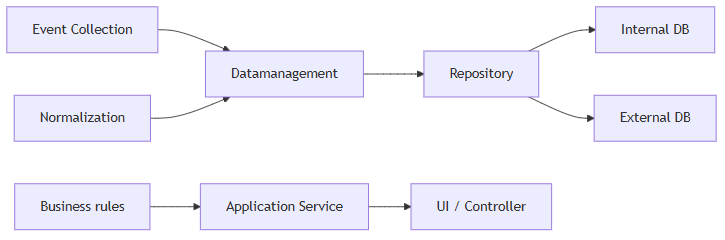
In summary, this chapter has reviewed typical functions and their relationship to layers. The next chapter will introduce layers in detail.
3. Business language and responsibility boundaries
In this chapter, I present the structure of a time registration system from a business point of view. It will not be about technologies or databases, but about responsibility limits: about which part of a system answers which questions. This type of layering is not based on technical concerns, but on business responsibilities, where each layer has a well-defined role in the use of business language.
I will discuss the detailed technical implementations and samples in later articles. The goal here is to understand in business language where decisions are made.
This responsibility-based separation closely resembles the architectural principles described in Domain-Driven Design and layered architecture patterns [1]
3.1. Presentation layer – “What does the user want to see?”
The Presentation layer answers the question of what and in what form the user wants to see.
This layer is responsible for rendering and interaction, not computation.
Here, for example, the user enters:
- the period,
- the breakdown method (daily, monthly),
- organizational filters (cost centers, areas),
- the classifications (intellectual, productive).
It is important to emphasize: the Presentation layer does not make business decisions. It doesn’t know what counts as presence or absence — it just displays what the system has already decided.
This layer is responsible for:
- display results (table, list),
- export,
- managing user settings.
3.2. Application Service layer – “What’s happening now?”
This layer coordinates business operations.
It defines what steps a process consists of and in what order they should be performed.
For example:
- preparation of a monthly working time report,
- summation of a given period.
The Application Service:
- compiles the necessary data,
- defines the steps of the process,
- designates the boundaries of transactions.
What is particularly important: is that layer does not make business decisions. Even here, what counts as presence or absence is not decided — that is not the task of this layer.
3.3. Domain layer – “What does this mean for the company?”
The Domain layer is the business core of the system.
Decisions are made here that reflect the regulation of a particular company.
For example, it is decided in this layer:
- what counts as presence,
- what constitutes an absence,
- how to handle exceptions.
Typical domain rules in a timekeeping system:
- shift and tape schedules,
- breaks between work,
- handling of special or individual cases,
- interpretation of regulations.
This layer is unaware of databases, user interfaces or report format. It only knows what the correct decision is according to the company’s rules.
In this approach, the Domain layer carries the common business language and rule system around which the entire system is organized. This central role is what makes the domain not a technical detail, but the heart of the system. The central role of business rules and processes in the Domain layer aligns with the ‘Ubiquitous Language’ concept described by Evans [1], where all system concepts originate from the domain itself.
3.4. Infrastructure – “Where does the data come from?”
The task of the infrastructure is to provide source data for the system.
These data can come from several independent systems.
Typical data sources:
- entrance gates,
- card reader terminals,
- external HR systems,
- administrative records.
The infrastructure layer does not make business decisions and is unaware of business rules. Its sole task is to make the data available to the system.
4. Introducing layers through a sample process
In this chapter, I will show how the previously presented layers work together through the process of generating a monthly timesheet. The goal is not to present the details of the implementation, but to illustrate where decisions are made and where they are not.
The following example shows how a business question (creating a monthly time table) can be turned step-by-step into an actionable process, while keeping the business rules in the domain throughout.
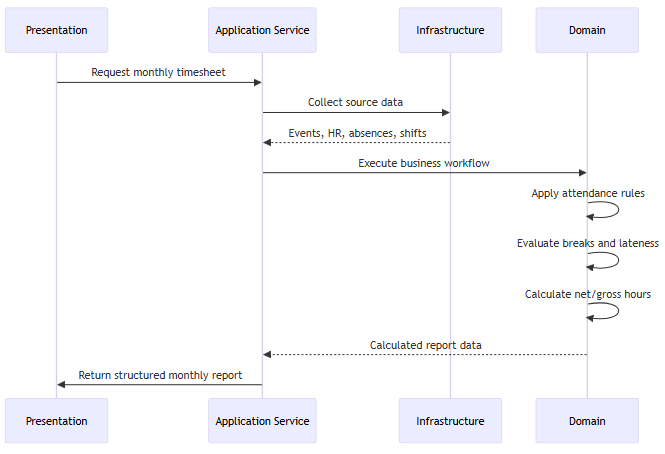
The process starts in the Presentation layer. When the user starts the application, this layer displays the user interface: menus, filters, selection options. The user specifies here, for example, that:
- the month for which data if requested,
- the organizational units to be included in the report
When the user initiates the request, the request is passed to the Application Service layer.
The task of the Application Service layer in this process is to compile the steps necessary to prepare the monthly time table. It defines:
- what data is needed,
- from where the data should be retrieved,
- in which order the processing should take place.
To prepare the monthly time table, the following data are typically required, which come from various sources:
- employee data: HR system
- event logs: access gates and card reader terminals
- shift assignments: administrative records
- remote work records
The Application Service layer does not interpret this data and makes no business decisions. The collected data is forwarded to the Domain layer according to the logic of the business process.
The Domain layer applies the company’s time registration rules and performs the necessary calculations. For example, it is decided here:
- what counts as presence and what counts as absence,
- how to deal with delays or early departures,
- how breaks between working periods affect total working time.
Typical results for a monthly timetable:
- net and gross time worked,
- classification of presence and absence,
- starting and ending work in relation to the shift schedule.
The Domain layer returns the calculated results to the Application Service layer.
The Application Service layer collides the partial results into a consistent structure, and then forwards the finished result to the Presentation layer. The Presentation layer displays the data of the monthly time table in a tabular form that is easy to understand for the user, and provides the possibility to export it in various formats.
The separation of layers protects the domain logic, an approach also recommended by Fowler in the context of complex business systems. [3]
This example clearly shows that the central element of a timekeeping system is the production of reports. The real value of the system lies in the fact that it produces meaningful and realiable business insights. In the next chapter, I will discuss the role and importance of reporting in more detail.
5. Reports as business products
The previous chapters showed how a timekeeping system should be built and the layers along which responsibilities should be separated. In this chapter, we seek an answer to the question why reports can be considered the most important business output of the system. In this approach, reports are not technical outputs, but products produced by the business domain.
Time and attendance systems primarily collect raw operational data: entries, exits, assignments, absences. However, this data is difficult to interpret by on its own and are not directly suitable for decision-making. The role of the reports is to place the raw data in a business context and to present it in a structured and comparable form.
Although such a system eliminates certain administrative tasks (such as paper attendance sheets), its real value lies in supporting informed business decisions.
Typical decision-making situations served by the reports:
- personnel planning
- management of overtime
- measuring efficiency
- preparation of payroll
- supporting management decisions
Reports and target groups
Reports are typically based on the same basic data, but they do not have to appear in the same form for all users. A team leader needs different information than HR or senior management. An equally important aspect is who has access to what data and in what breakdown.
Therefore, reporting is closely related to authorization management. In practice, this is most often achieved with role-based access control (RBAC), where users belong to different roles. The role determines not only which reports a user can access, but also with what detail the given report with what level of detail the report is presented to them. Managing permissions in this way is not only a security concern, but also reflects a deliberate separation of business roles and perspectives. [3]
While hours worked, attendance and absences are the most important for HR, efficiency indicators, trends and summaries are also emphasized for management.
What makes a report interpretable?
A report is not a simple list or data extraction. A well-prepared report answers specific business questions and helps decision-making. A good report:
- clear,
- easy to interpret,
- gives context to the numbers,
- and should be largely self-explanatory.
It is not enough to simply display the results; it is also important that the report presents the data and circumstances that led to the results.
For example, if a manager sees that a group achieved only 40% performance on a given day, it is easy to conclude that the group is underperforming. However, when the report is supplemented with additional contextual information – such as average weekly performance, workload indicators or training activities – a very different picture may emerge. It may turn out that the average performance is normally around 80%, but on that particular day a significant portion of the team was absent. In that case, the 40% does not indicate a performance issue but rather reflects exceptional circumstances.
Reports and business rules
It is important to emphasize that the reports do not present absolute truths, but are prepared according to the company’s business rules. What counts as attendance, overtime or productive work is always a result of organizational decisions.
These rules are formulated and applied in the domain layer of the system. As business rules change over time, reporting needs are also constantly changing. A well-designed system must be able to handle these changes while maintaining data consistency.
This also means that it is impossible to design every aspect of the system perfectly in advance. In this sense, reporting is the stage where raw operational data is transformed into meaningful business insight through the consistent application of domain rules. In the next chapter, we will examine what is worth laying down in advance when planning a system, and in which areas it is necessary to consciously leave room for later changes.
6. Closing Thoughts
In summary, it becomes clear that designing a time and attendance system is not primarily a technological problem.
The first questions we should ask are not:
- What programming language should we use?
- Which database should store the data?
- What columns should the database tables contain?
Instead, the more relevant questions are:
- What does the company consider presence?
- Who needs to see what — and why?
- What makes a report truly useful for decision-making?
A well-designed system starts with business language.
Its final outputs are the reports, which should be seen as business products rather than technical artifacts. Entry and exit events are merely raw materials: on their own, they say very little, but through proper interpretation they become meaningful support for decision-making. A good report does not simply display numbers — it tells the story of a given period.
The demand for these outcomes usually remains stable. What changes over time are the regulations, organizational structures, and decision-making mechanisms behind them. For this reason, the goal is not to rigidly define every implementation detail in advance, but to establish a way of thinking that can adapt to change. Software is not valuable because it is written in Python or Java, but because it speaks the language of the business.
A developer can work truly effectively only when they understand both the business rules and the intent behind them. Likewise, managers can express their needs much more clearly when they are able to speak in their own business concepts instead of technological abstractions.
This mindset is closely aligned with the principles of Domain-Driven Design (DDD), described in detail by Eric Evans.
Interestingly, this article did not begin with DDD terminology, but with the effort to understand a real business problem. This itself demonstrates one of the core strengths of DDD: it is not merely a methodology, but a way of thinking that naturally emerges when software design starts from domain understanding.
In the following articles, I will explore specific subdomains in greater detail — including data management, reporting patterns, and the handling of evolving business rules — always from the same business-centered perspective.
Források
[1] Evans, E. (2003). Domain-Driven Design: Tackling Complexity in the Heart of Software. Addison-Wesley.
[2] Kimball, R. & Ross, M. (2013). The Data Warehouse Toolkit. Wiley.
[3] Sandhu, R. et al. (1996). Role-Based Access Control Models. IEEE Computer, 29(2), 38–47.